
Last updated on
Oct 31, 2026
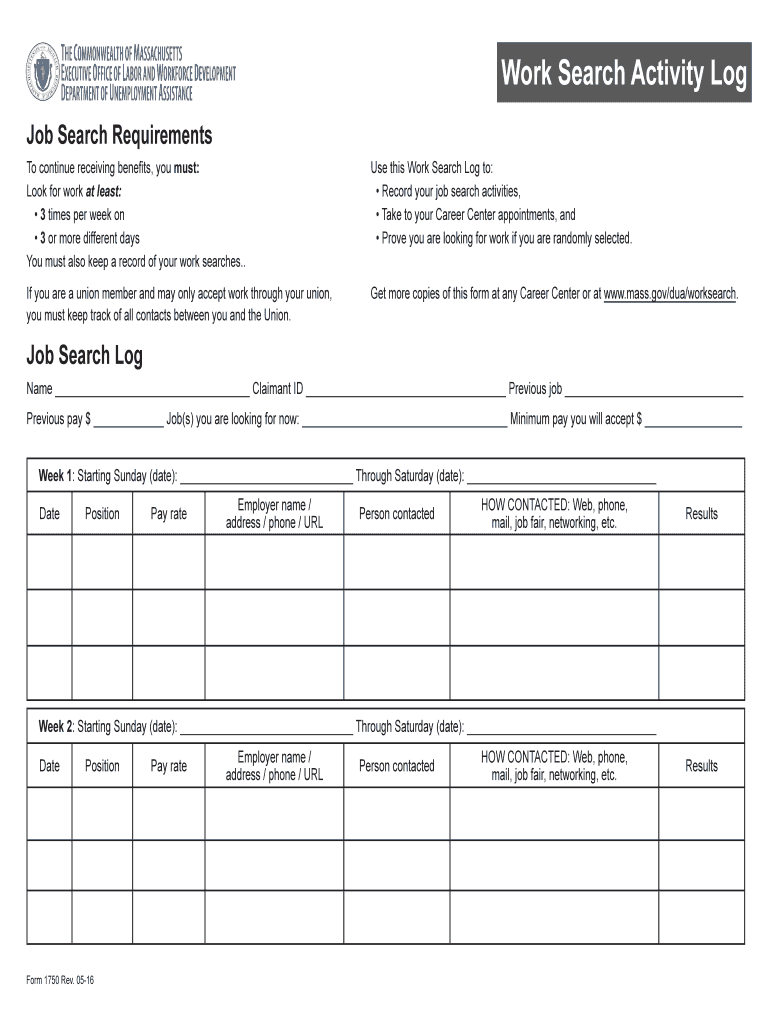
Get the free Massachusetts Work Search Activity Log
We are not affiliated with any brand or entity on this form

Fill out
Complete the form online in a simple drag-and-drop editor.

eSign
Add your legally binding signature or send the form for signing.

Share
Share the form via a link, letting anyone fill it out from any device.

Export
Download, print, email, or move the form to your cloud storage.
Why pdfFiller is the best tool for your documents and forms


End-to-end document management
From editing and signing to collaboration and tracking, pdfFiller has everything you need to get your documents done quickly and efficiently.
Accessible from anywhere
pdfFiller is fully cloud-based. This means you can edit, sign, and share documents from anywhere using your computer, smartphone, or tablet.
Secure and compliant
pdfFiller lets you securely manage documents following global laws like ESIGN, CCPA, and GDPR. It's also HIPAA and SOC 2 compliant.
What is Work Search Log
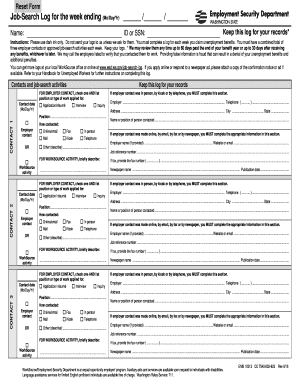
The Massachusetts Work Search Activity Log is a document used by job seekers to record job search activities and demonstrate their active pursuit of employment for unemployment benefits.
pdfFiller scores top ratings on review platforms




My experience has been wonderful. I paid a lot of money for a divorce site that would allow me to use fillable forms. It was frustrating from the beginning. I started using PDFfiller instead, and requested a full refund from the other service. They refunded my money. I have had great luck finding everything I need for this divorce. Your help support is great! I would certainly recommend this company/service to anyone.
Made worming from home super easy! I can do anything from my couch...
Who needs Work Search Log?
Explore how professionals across industries use pdfFiller.

Work Search Log is needed by:
-
Unemployed individuals seeking unemployment benefits
-
Job seekers in Massachusetts needing to log job search attempts
-
Career Center staff assisting job seekers
-
State officials reviewing unemployment claims
-
Employment counselors providing job search support
Comprehensive Guide to Work Search Log
What is the Massachusetts Work Search Activity Log?
The Massachusetts Work Search Activity Log is a crucial tool for job seekers in the state of Massachusetts. This form is specifically designed to document job search activities to ensure continued eligibility for unemployment benefits. Keeping an accurate log of all job searches is not only essential for meeting unemployment requirements but also for tracking progress in the job hunt.
Accessible through Career Centers or the state’s official website, the Massachusetts Work Search Activity Log serves as a vital record for applicants. Its importance is underscored by the potential need for verification during the unemployment benefits application process.
Purpose and Benefits of the Massachusetts Work Search Activity Log
Utilizing the Massachusetts Work Search Activity Log effectively is crucial for maintaining eligibility for unemployment benefits. This log allows users to keep a detailed and organized record of their job search activities, which serves multiple purposes.
-
Enhances personal accountability in the job search process.
-
Facilitates easier reporting and verification of job search efforts.
-
Supports applicants in adhering to the requirements set by the Massachusetts unemployment system.
Key Features of the Massachusetts Work Search Activity Log
The Massachusetts Work Search Activity Log comes with specific features that are essential for job seekers. Understanding these components can significantly streamline the logging process.
-
Required fields include date, employer details, position applied for, and contact methods.
-
Additional checkboxes and spaces are provided for notes on each job application.
-
A fillable PDF format is available, enhancing user accessibility.
Who Needs the Massachusetts Work Search Activity Log?
This form is primarily aimed at job seekers who are required to document their job search activities to qualify for unemployment benefits. Individuals who have recently become unemployed or those actively seeking new job opportunities fall under this category.
Understanding the eligibility criteria is essential, as not all individuals may be required to submit this log. However, for those receiving unemployment benefits, maintaining this log is a stipulation for continued support.
How to Fill Out the Massachusetts Work Search Activity Log Online (Step-by-Step)
Filling out the Massachusetts Work Search Activity Log online is straightforward with the right guidance. Follow these step-by-step instructions to ensure your form is completed correctly.
-
Access the log through the official state’s website or your local Career Center.
-
Enter your claimant ID in the designated field.
-
Provide details such as the date of the job application and the employer's name.
-
Specify the method of contact used with each employer.
-
Review your entries for accuracy before submission.
Submission Methods for the Massachusetts Work Search Activity Log
Submitting the completed Massachusetts Work Search Activity Log can be done through several methods, ensuring flexibility for job seekers. Here's how you can submit your log:
-
Online submission via the state's unemployment portal.
-
In-person delivery at your local Career Center.
-
Mailing the form to the appropriate department.
It is crucial to be aware of submission deadlines to avoid penalties or loss of benefits.
Common Mistakes When Completing the Massachusetts Work Search Activity Log
Many job seekers encounter pitfalls when filling out the Massachusetts Work Search Activity Log. Recognizing these common mistakes can help improve the accuracy of your submission.
-
Failing to complete all required fields can lead to complications.
-
Neglecting to include specific details related to job applications.
-
Not double-checking entries prior to submission.
Maintaining thorough records not only aids in accuracy but is also crucial for verification purposes.
How pdfFiller Can Help You with the Massachusetts Work Search Activity Log
pdfFiller provides valuable assistance in completing and submitting the Massachusetts Work Search Activity Log. With its robust features, users can easily manage their forms.
-
Edit and annotate PDF documents for clarity and accuracy.
-
Utilize e-signing capabilities for quicker submissions.
-
Maintain document security to protect sensitive information.
This platform simplifies the process, ensuring users can fill out forms efficiently no matter where they are.
Next Steps After Submitting Your Massachusetts Work Search Activity Log
Once you have submitted your Massachusetts Work Search Activity Log, it's important to understand what happens next. Users can expect processing times, which can vary based on the volume of submissions.
-
Monitor your application status through the unemployment portal.
-
If the form is rejected, review the feedback provided to make necessary corrections.
-
Keep a copy of your submission for future reference and verification.
Being prepared for these next steps can help alleviate concerns and ensure a smooth continuation of benefits.
How to fill out the Work Search Log
-
1.Access pdfFiller and search for the Massachusetts Work Search Activity Log. Open the form to begin filling it out.
-
2.Navigate the form using pdfFiller's user-friendly interface. Click into each field to enter relevant information.
-
3.Gather necessary information before starting. Collect details such as job titles, employers, dates of application, and methods of contact.
-
4.Carefully fill in the form, ensuring accuracy in each field. Record your name, Claimant ID, previous job roles, and job search activities.
-
5.Review the completed form for any errors. Check each field against your gathered information to ensure accuracy and completeness.
-
6.Finalize your form on pdfFiller by saving your work. Click 'Save' to ensure your information is recorded.
-
7.Download or submit your completed form directly through pdfFiller. Choose the download option for a copy or submit it as instructed.

Who is eligible to use the Massachusetts Work Search Activity Log?
Individuals receiving unemployment benefits in Massachusetts and actively seeking work are eligible to use this log to document their job search activities.
What is the deadline for submitting the Work Search Activity Log?
While specific deadlines may vary, it is generally recommended to submit your log in conjunction with your unemployment benefit application or weekly certification to ensure compliance.
How do I submit the Massachusetts Work Search Activity Log?
You can submit the completed log by downloading it from pdfFiller and mailing it to the appropriate Career Center or submitting it online if your claim allows.
What documents do I need to complete the Work Search Activity Log?
Before filling out the log, gather details about each job application you’ve submitted, including employer information, position applied for, and contact methods.
What common mistakes should I avoid when completing the log?
Ensure you accurately fill out every section of the log. Common mistakes include forgetting to include job search dates or misrecording employer details.
How long does it take to process the Work Search Activity Log?
Processing times can vary based on the Career Center's workload. Generally, you can expect to receive feedback regarding your log within a week or two.
Can the Massachusetts Work Search Activity Log be filled out online?
Yes, the form can be filled out online using pdfFiller, allowing for easy digital access and submission.
Related Content
Related Forms

Related Catalogs
Get the latest insights from our blog


If you believe that this page should be taken down, please follow our DMCA take down process
here
.
This form may include fields for payment information. Data entered in these fields is not covered by PCI DSS compliance.